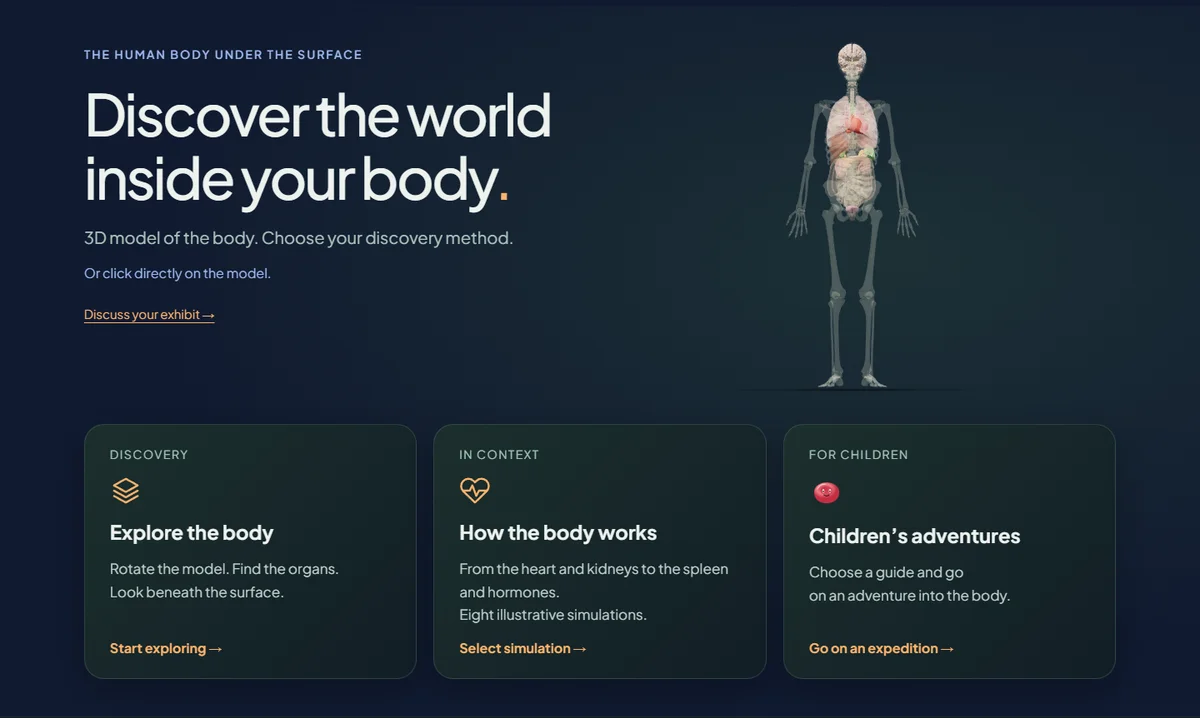
An interactive 3D museum exhibit combines a digital model with visitor controls and a clear explanation. Choose it when rotation, a cutaway or a change of state answers a specific question. Plan the source data, rights, touchscreen controls, accessible alternatives and maintenance before commissioning the finished application.
Start with a question the model can answer
Write the question before requesting a scan. For a gearbox, it might be: why does the output turn more slowly in first gear? For anatomy: where is the pancreas in relation to the stomach? For an archaeological object: what can we see on its reverse? If an annotated photograph answers the same question clearly, a 3D model may add unnecessary cost.
Choose a scanned object, a reconstructed model or an educational diagram
A scan records the visible surface of an object; it does not automatically supply its interior. A reconstruction needs a documented interpretation of missing or inaccessible parts. An educational model can simplify geometry to explain a process. Label reconstructions and simplifications so visitors can distinguish recorded evidence from interpretation. Ask who approves the content and how corrections will be made.
Turn movement into an explanation
Our mechanics demonstration connects the selected gear to shaft speeds, component labels and a cylinder cutaway. The anatomy demonstration lets visitors select organs and open eight educational simulations. These are working examples of the interaction, not claims of clinical or engineering validation. Use one initial view, one clear action and a short explanation of the visible result.
Prepare geometry for the actual kiosk
A high resolution archive model and a responsive gallery model serve different jobs. Test the application on the intended computer, touchscreen and browser. Check cold loading, rotation, selection of small parts, memory use and recovery after a graphics interruption. Where the exhibit must work offline, package its geometry, fonts and software locally and verify a complete session with the network disconnected.
Offer more than dragging a model
Provide labelled reset and zoom controls, a predictable first view and a way to select important structures without precise pointing. Include readable text alongside any essential animation and allow motion to pause. Test reach, contrast and instructions in the real gallery. WCAG provides useful guidance for the web interface; the physical installation also needs its own accessibility review.
Agree rights and handover before launch
Confirm rights for the source geometry, textures, reconstructions and exported images. Our anatomy example credits BodyParts3D and keeps separate attribution for the added lung surfaces. A handover should identify the content owner, editable files, supported environment, update procedure and a simple restart method. Test what a new visitor sees after the previous visitor leaves.
Choose an interaction for the visitor question
| Visitor question | Suitable interaction | What to check |
|---|---|---|
| What is hidden on the reverse? | Rotate a surface model | Scan coverage and readable details |
| How do the parts work together? | Animate a simplified mechanism | Correct relationships and a pause control |
| Where is an organ? | Select, isolate and label anatomy | Clear orientation and a route back to the body |
Try the working demonstrations
Before you request a proposal
- One visitor question and a written learning objective.
- A documented model source, permitted uses and visible attribution.
- A tested first view, reset, zoom and non-pointer selection.
- A budget for content review, optimisation, translation and updates.
- Cold-load, offline if required, idle-reset and graphics-recovery checks on the final device.
Questions worth asking
Does every exhibit need a 3D scan?
No. A scan suits a real surface that visitors need to inspect. A constructed model may be more useful for a mechanism or an explanatory cutaway. Choose the method after defining the visitor question.
Can a 3D museum exhibit run without internet?
Yes, when the application and all required data are installed locally. External videos, remote geometry, online fonts or hosted services must be removed or replaced for the offline installation.
How much does an interactive 3D exhibit cost?
The main variables are the source model, geometry preparation, number of interactions, interpretation, languages, hardware and support. Request a quote against an agreed specimen model and interaction list; a screen price alone does not describe the complete exhibit.
Can we try the interaction before commissioning it?
Yes. Open the anatomy or mechanics demonstrations below. Use them to discuss the visitor journey, controls and level of detail for your own exhibition.
Turn the idea into a brief
Send us the object or topic, the visitor question, available model data and intended screen. We can discuss a small demonstrator and a practical scope for your exhibition.